


Doesn't join meetings.
Tofia never appears in the guest list, so there are no bots or extra participants in your call.
 Tofia
Tofia
For non-native professionals in English meetings
Use Tofia in any browser or app on your computer:
'%20d='M256%20128c0%2013.568-1.024%2027.136-3.328%2040.192-6.912%2043.264-41.216%2077.568-84.48%2084.48C155.136%20254.976%20141.568%20256%20128%20256s-27.136-1.024-40.192-3.328c-43.264-6.912-77.568-41.216-84.48-84.48C1.024%20155.136%200%20141.568%200%20128s1.024-27.136%203.328-40.192c6.912-43.264%2041.216-77.568%2084.48-84.48C100.864%201.024%20114.432%200%20128%200s27.136%201.024%2040.192%203.328c43.264%206.912%2077.568%2041.216%2084.48%2084.48C254.976%20100.864%20256%20114.432%20256%20128'/%3e%3cpath%20fill='%23fff'%20d='M204.032%20207.872H75.008c-8.448%200-16.64-4.608-20.48-12.032-4.608-8.704-2.816-19.2%204.096-26.112l89.856-89.856H83.968c-17.664%200-32-14.336-32-32h118.784c8.448%200%2016.64%204.608%2020.48%2012.032%204.608%208.704%202.816%2019.2-4.096%2026.112l-89.6%2090.112h74.496c17.664%200%2032%2014.08%2032%2031.744'/%3e%3c/svg%3e) Zoom
,
Zoom
,
 Google Meet
,
Google Meet
,
'%20d='M10.913%2053.581h109.15c6.028%200%2010.914%204.886%2010.914%2010.913v109.151c0%206.027-4.886%2010.913-10.913%2010.913H10.913C4.886%20184.558%200%20179.672%200%20173.645V64.495C0%2058.466%204.886%2053.58%2010.913%2053.58'/%3e%3cpath%20fill='%23fff'%20d='M94.208%2095.125h-21.82v59.416H58.487V95.125H36.769V83.599h57.439z'/%3e%3c/svg%3e) Teams
,
Teams
,
 Webex
,
Webex
,
 Slack
,
Slack
,
 Discord
,
Discord
,
'%20d='M5.463%20127.456c-.006%2021.677%205.658%2042.843%2016.428%2061.499L4.433%20252.697l65.232-17.104a123%20123%200%200%200%2058.8%2014.97h.054c67.815%200%20123.018-55.183%20123.047-123.01c.013-32.867-12.775-63.773-36.009-87.025c-23.23-23.25-54.125-36.061-87.043-36.076c-67.823%200-123.022%2055.18-123.05%20123.004'/%3e%3cpath%20fill='url(%23whatsapp-white)'%20d='M1.07%20127.416c-.007%2022.457%205.86%2044.38%2017.014%2063.704L0%20257.147l67.571-17.717c18.618%2010.151%2039.58%2015.503%2060.91%2015.511h.055c70.248%200%20127.434-57.168%20127.464-127.423c.012-34.048-13.236-66.065-37.3-90.15C194.633%2013.286%20162.633.014%20128.536%200C58.276%200%201.099%2057.16%201.071%20127.416m40.24%2060.376l-2.523-4.005c-10.606-16.864-16.204-36.352-16.196-56.363C22.614%2069.029%2070.138%2021.52%20128.576%2021.52c28.3.012%2054.896%2011.044%2074.9%2031.06c20.003%2020.018%2031.01%2046.628%2031.003%2074.93c-.026%2058.395-47.551%20105.91-105.943%20105.91h-.042c-19.013-.01-37.66-5.116-53.922-14.765l-3.87-2.295l-40.098%2010.513z'/%3e%3cpath%20fill='%23fff'%20d='M96.678%2074.148c-2.386-5.303-4.897-5.41-7.166-5.503c-1.858-.08-3.982-.074-6.104-.074c-2.124%200-5.575.799-8.492%203.984c-2.92%203.188-11.148%2010.892-11.148%2026.561s11.413%2030.813%2013.004%2032.94c1.593%202.123%2022.033%2035.307%2054.405%2048.073c26.904%2010.609%2032.379%208.499%2038.218%207.967c5.84-.53%2018.844-7.702%2021.497-15.139c2.655-7.436%202.655-13.81%201.859-15.142c-.796-1.327-2.92-2.124-6.105-3.716s-18.844-9.298-21.763-10.361c-2.92-1.062-5.043-1.592-7.167%201.597c-2.124%203.184-8.223%2010.356-10.082%2012.48c-1.857%202.129-3.716%202.394-6.9.801c-3.187-1.598-13.444-4.957-25.613-15.806c-9.468-8.442-15.86-18.867-17.718-22.056c-1.858-3.184-.199-4.91%201.398-6.497c1.431-1.427%203.186-3.719%204.78-5.578c1.588-1.86%202.118-3.187%203.18-5.311c1.063-2.126.531-3.986-.264-5.579c-.798-1.593-6.987-17.343-9.819-23.64'/%3e%3c/svg%3e) WhatsApp
,
or anywhere else audio plays.
WhatsApp
,
or anywhere else audio plays.
No credit card required · 100 free minutes every month
Before we move on, I want to make sure the timeline is realistic.
ME I can make Friday a clear status update, then share the final version after QA.
I can make Friday a clear status update with the remaining risks.
Static preview · Enable JavaScript for the interactive demo
Private by design
Tofia never joins as a bot, stays out of screen share, and keeps your meeting data out of AI training.
Tofia never appears in the guest list, so there are no bots or extra participants in your call.
Tofia's overlay is designed to stay out of shared screens, recordings, and external meeting tools.
Sensitive meeting data is never used to train AI models and is automatically deleted after 30 days.
Realtime translation
Translate across English, Korean, Chinese, Japanese, Spanish, and more in the same meeting.
Partial translations update while people speak, so you can stay in the flow.
Keeps domain-specific terms like CAC, ARR, and SOC 2 tied to your session background.
Uses the calendar, meeting title, and conversation flow to choose the right phrasing.
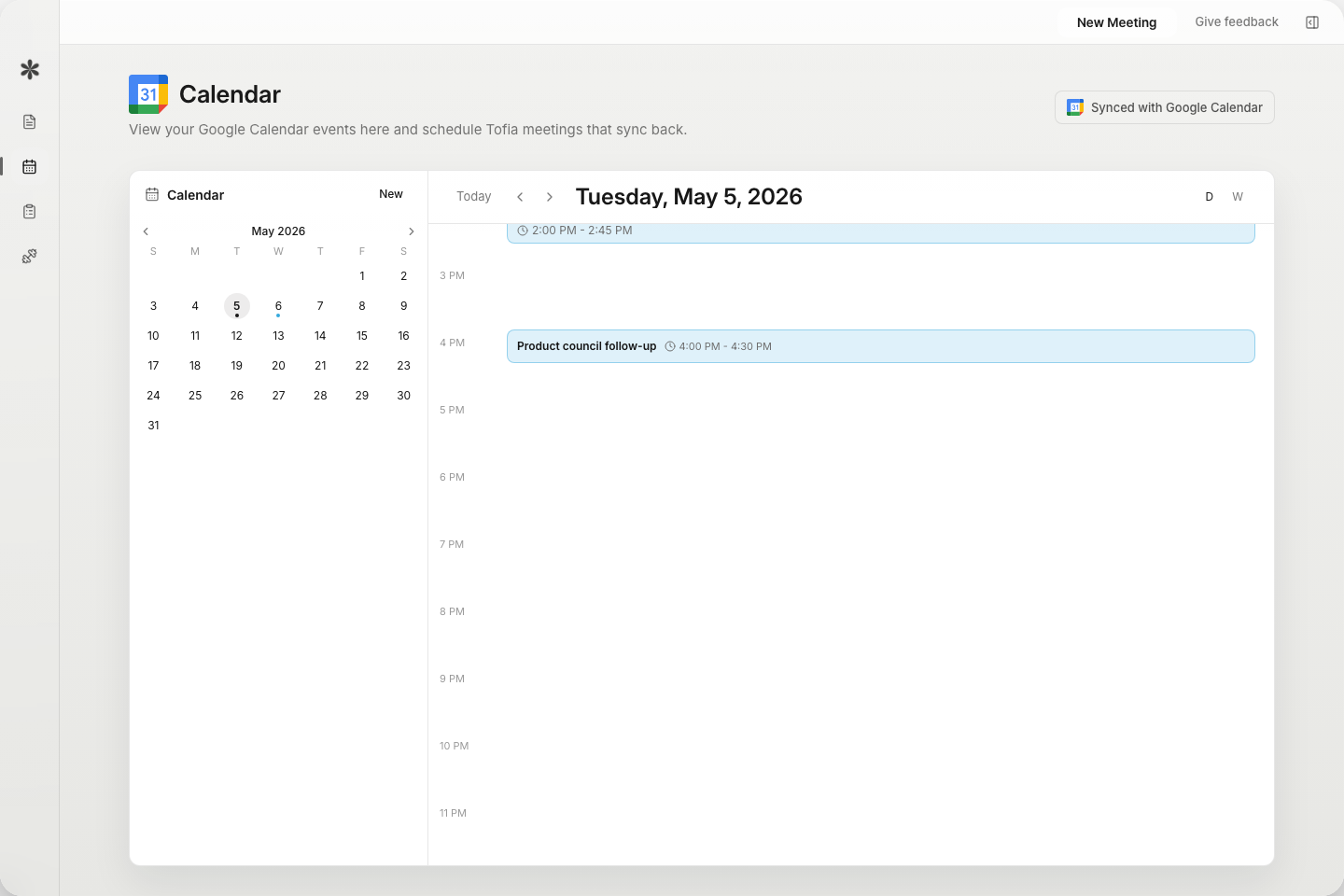
Tofia brings pre-call context, live assistance, and post-call practice into one small desktop app.
Start from the calendar, then see the meeting status, risks, and people Tofia already matched.
Pricing
Review the prices here. Payment happens after you sign in to the desktop app or Chrome extension.
A low-friction trial
100 minutes each month to test Tofia in real meetings.
For weekly meetings and live language support
600 minutes each month. Install Tofia first, then choose Basic during onboarding.
For heavy meeting days and private workflows
2,000 minutes each month. Install Tofia first, then choose Pro during onboarding.
FAQ
Have more questions? Send us a note below and we’ll get back to you as soon as we can.
Most AI note takers focus on recording a meeting for later. Tofia is a real-time meeting translation assistant you use during the call. It keeps live transcript, translation, and summaries visible, suggests natural replies when you get stuck, and then gives you meeting notes, action items, and coaching feedback after the meeting.
Tofia is for non-native professionals who feel friction in English meetings, whether that is listening, replying, or handling follow-ups afterward. It is especially useful for employees, sales teams, researchers, students, founders, and remote workers who join English calls every week and want to communicate more clearly.
Yes. You can start on the Free plan with 100 minutes each month. Basic and Pro add more monthly meeting time.
Tofia is a standalone desktop app, not a meeting bot. It does not join as an extra participant, so it will not appear in the guest list. With Invisibility mode on, Tofia can stay hidden from screen share, recordings, external meeting-tool capture, the Dock, taskbar, menu bar, and system tray.
Tofia works with any audio playing on your computer, including Zoom, Google Meet, Microsoft Teams, Slack, Discord, WhatsApp, YouTube, and browser tabs. It does not need a meeting bot or app-specific integration.
Tofia is built around English meetings and supports real-time translation across English, Korean, Chinese, Japanese, Spanish, and more. We are continuing to expand language coverage, so send a note below if you need a specific language.
For team rollout, large-scale deployment, or security review, send us a note below. We can help with options that fit your usage, onboarding, and admin requirements.